




At 4A Consulting, we’re excited to share an incredible milestone in our journey. Recently, we were featured as one of the top 8(a) small businesses driving transformative change at the Internal Revenue Service (IRS). This recognition by Orange Slices is a significant testament to the hard work and dedication of our talented team, and our ongoing commitment to delivering impactful solutions for federal agencies.
How to Transform a Traditional Dynamics 365 Model-Driven App into a Modern SaaS-Style Enterprise Platform
For years, model-driven apps have been one of the fastest ways to build enterprise applications on Microsoft Dynamics 365 and Power Platform. The platform offers powerful capabilities, including Dataverse integration, security, automation, workflows, scalability, and rapid application development. Yet one challenge consistently surfaces across enterprise implementations: why do so many business applications still feel like traditional CRM systems rather than modern SaaS products?
Today’s users compare enterprise software to products like Notion, Salesforce, Jira, Monday.com, and Asana. They expect responsive interfaces, contextual dashboards, guided workflows, modern navigation, and visually engaging experiences. That shift in user expectation fundamentally changed how I approach application design on Dynamics 365.
The issue with many model-driven applications is not a lack of functionality. In most cases, the platform already supports the business processes, data relationships, approvals, and automation required to run the operation. The real challenge is that the user experience often remains too generic for the operational complexity of the work.
When users have to move across forms, subgrids, dashboards, and records just to understand what needs attention, the system becomes harder to adopt. The friction is not caused by weak technology. It comes from an experience that is not organized around user context. That distinction matters because modern business applications are expected to guide work, not simply store it.
Once I framed the problem that way, the objective became much clearer: not to add customization for its own sake, but to redesign the experience into something more focused, connected, and intentional.
The most important design decision was to avoid treating modernization as a full rebuild exercise. It would have been possible to move toward a separate custom frontend, but that would also mean giving up part of what makes Dynamics 365 attractive in the first place: native security, structured data, business rules, workflow orchestration, and platform governance.
Instead, I used a hybrid approach. The system kept Dataverse, plugins, approvals, automation, and relationship-driven business logic as its foundation, while the experience layer was selectively redesigned through HTML web resources, JavaScript-based dashboards, embedded record experiences, KPI components, and PCF controls.
That hybrid approach made it possible to modernize the highest-friction user interaction without discarding the strengths of the platform underneath. In practice, the goal was not cosmetic change. It was to reduce navigation overhead, surface the right information at the right time, and create a workflow that felt more coherent from the user’s point of view.
Building a Workspace That Feels Closer to SaaS Than CRM
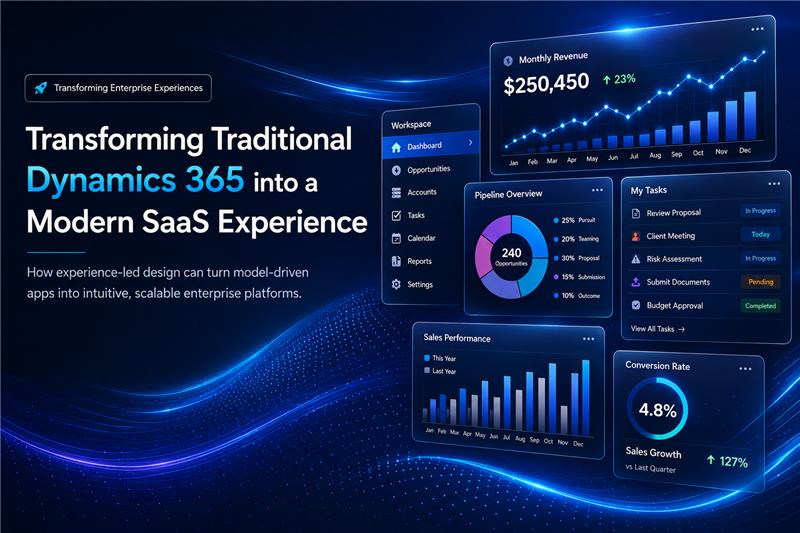
At the center of the redesign was a workspace model. Instead of pushing users through a sequence of disconnected forms and views, I created a more unified entry point where dashboards, progress indicators, metrics, actions, forms, and status signals could be experienced together. The application no longer behaved like a collection of disconnected records and pages. It started to function more like a working environment.
That shift had practical consequences. Users no longer had to spend as much effort finding context before taking action because the information relevant to the current process state was already visible where the work was happening. The experience became easier to follow and felt less administrative and more operational.
A simple way to picture the change is this: before modernization, the experience felt like moving room to room in an office building to complete one task. After modernization, it felt more like operating from a centralized a control room where the signals, actions, and next steps were already in front of you.
State-driven behavior also became far more important. Different phases of work were no longer treated as passive labels. They became active operating states with their own validations, dashboards, approvals, and rendering logic. By pairing those states with UI elements that made progress more visible, the system began guiding execution rather than simply recording it.
A more immersive experience only works if it remains fast enough to trust. Once dashboards, embedded components, and context-aware rendering become part of the design, performance can quickly become the limiting factor. If every interaction creates too many API calls or too many layers of rendering, the modernized interface starts working against itself.
That is why performance had to be built into the design rather than corrected later. I minimized duplicate Web API calls, limited unnecessary Dataverse queries, lazy-loaded components that were not immediately needed, and rendered only the sections relevant to the active workspace state. The goal was not merely technical optimization. It was to make sure the interface stayed responsive enough for users to remain inside the workflow without losing momentum.
In the end, the performance work mattered because it protected the experience. The system could feel richer and more guided without becoming heavy, which is often the difference between a redesign that looks impressive and one that actually works in practice.
Why This Matters to Clients
For clients, this shifts the conversation from incremental customization to measurable business improvement. A stronger experience layer can reduce navigation overhead, improve adoption, shorten onboarding time, and help teams complete work with less friction. The value becomes visible not only in usability, but in operational efficiency, consistency, and day-to-day execution.
It also strengthens governance and scalability. When the experience is designed around role-based context, clearer decision points, and more intuitive workflows, organizations can standardize how work gets done without overwhelming users with complexity. The result is a system that is easier to govern, easier to scale, and easier to trust.
In practical terms, the difference is visible in user behavior. Before modernization, users often move across multiple forms, views, and dashboards just to understand status and next steps. After modernization, they can enter a workspace, see the relevant signals immediately, and act faster with fewer clicks, less confusion, and less reliance on formal training.
For organizations, this opens a broader path to modernization. Dynamics 365 does not have to remain a system that simply stores records and processes transactions. With the right experience design, it can become a more connected operating layer where workflows, visibility, action, and governance come together in a way that supports how people actually execute work.
That creates opportunities for faster iteration, stronger adoption, and a more product-like interaction model without forcing a move away from the platform. For executive stakeholders, the outcome is clearer: higher efficiency, reduced training overhead, more consistent governance, and an experience architecture that can scale as processes evolve.
Just as important, the hybrid model allows organizations to modernize selectively. They can improve the user experience where it matters most while preserving the backend strengths of Dataverse, security, automation, and platform control.
Where 4A Fits in This Story
4A’s role is to turn platform possibility into something usable, scalable, and business-relevant. Many organizations know that Dynamics 365 can be customized. Fewer know how to redesign the experience in a way that improves usability without weakening architecture, governance, or delivery discipline.
That is where we contribute. We bring the product thinking, technical depth, and implementation structure needed to move beyond surface-level changes and deliver systems that feel more intentional from both a business and user perspective. The goal is not just to build features. It is to shape a better operating experience on top of the platform.
Final Thoughts
What this project reinforced for me is that the future of Dynamics 365 delivery is not only about extending functionality. It is about improving how work is experienced inside the platform. The backend foundation is already strong. The greater opportunity is to rethink the layer users interact with every day.
Modernization does not always require leaving the platform behind or rebuilding everything from scratch. Often, the smarter path is to preserve the strengths of Dynamics 365 while redesigning the experience around visibility, flow, and execution.
If your organization is evaluating how to modernize Dynamics 365 without losing governance, scalability, or platform control, this is exactly where 4A can help. We partner with organizations to modernize Dynamics 365 through experience-led transformation initiatives that improve usability, strengthen operational efficiency, and turn traditional model-driven apps into scalable, product-like enterprise platforms.