




At 4A Consulting, we’re excited to share an incredible milestone in our journey. Recently, we were featured as one of the top 8(a) small businesses driving transformative change at the Internal Revenue Service (IRS). This recognition by Orange Slices is a significant testament to the hard work and dedication of our talented team, and our ongoing commitment to delivering impactful solutions for federal agencies.
Generative AI in Dynamics 365
Most AI conversations stay abstract. This one doesn’t.
Enterprise software vendors have been promising AI-powered transformation for years. The language is familiar: intelligent automation, augmented workflows, next-generation productivity. What rarely follows is a frank account of what changed on the ground — what a developer built, what worked, and what it genuinely means for clients.
This is that account. Following Microsoft’s Generative AI rollout across Dynamics 365 and the Power Platform, I spent time building real solutions using Copilot — not evaluating a roadmap, but shipping working software. Here is what happened.
Microsoft Copilot is the delivery layer — an AI capability woven through Model Driven Apps, Power Apps, Power Automate, and Dataverse. It understands plain English, generates functional pages and automation flows, and connects directly to live business data.
The feature that immediately changed how I work is Describe a Page. You write a natural-language description of what you need. Copilot builds the entire screen — not a wireframe, not a prototype, but a fully functional page with real Dataverse tables mapped, fields connected, and live data surfaced.
The structural shift: UI design and backend data integration happen in a single generation step. There is no second phase where a developer manually wires connections. The screen and its data layer are created together — simultaneously.
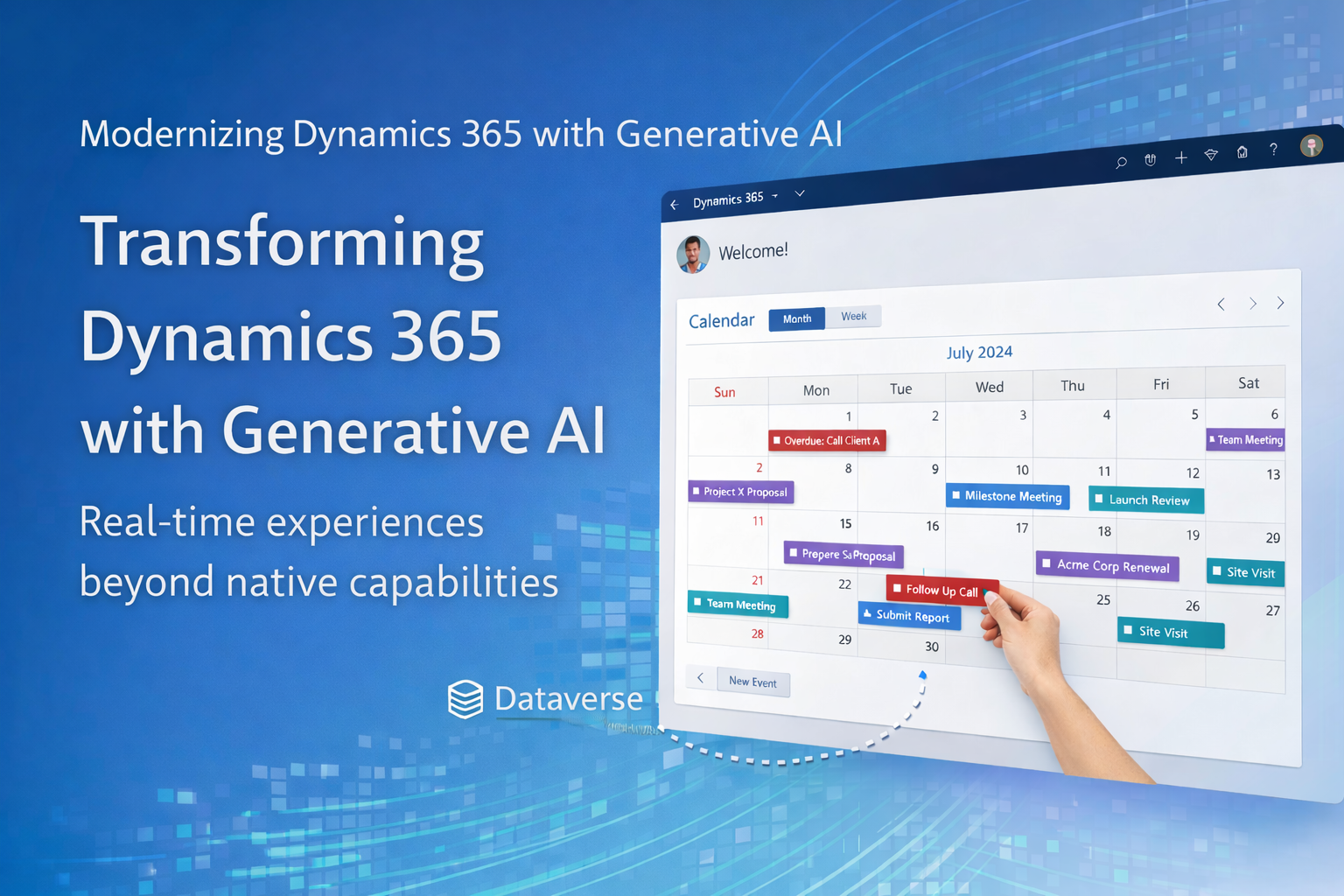
Using Generative AI, I built a fully functional calendar control in Dynamics 365 that operates as a real-time interactive layer over Dataverse rather than just a visual component. It dynamically surfaces Next Steps records in a structured monthly view and supports drag-and-drop interactions that instantly update underlying data, combining both UI behavior and business logic in a single experience — something that typically requires significant custom development.
What I Achieved
- Built a calendar control for custom entities, which is not available natively in Dynamics 365
- Integrated real-time Dataverse data retrieval and display
- Enabled drag-and-drop rescheduling, updating date fields instantly
- Enabled ownership reassignment via drag-and-drop between users
- Combined UI interaction and backend updates in a single action
- Implemented automatic highlighting of overdue records
- Added color-coded categorization for better visualization
- Delivered functionality equivalent to a custom PCF control without full custom development
- Reduced development time significantly using Generative AI prompting
“This capability does not exist natively in Dynamics 365. When a user drags a Next Step to a new date, it reschedules the underlying Dataverse record in real time. I achieved it entirely through prompting.”
The AI-generated calendar was impressive from the first prompt. What made it genuinely powerful was being able to read the output critically. As a developer who understands TypeScript and React, I could immediately identify where to push further — filtering completed records server-side, adding drop target visual feedback, correcting the color logic. None of that required rewriting from scratch.
- AI generates the scaffold, the boilerplate, and the initial integration
- The developer reads the output, identifies exactly what needs improving, and prompts with precision
- The result is better and faster than either could produce independently
“The AI gets you 80%. Your knowledge as a developer turns it into 100%. When you combine both well — you can do miracles.”
The calendar and dashboard are not technical demonstrations for their own sake. They represent a new economics of Dynamics 365 delivery company, one with direct consequences for every organization using the platform.
- Features once out of scope are now in scope. Custom capability that previously required weeks is achievable within a sprint.
- Iteration is faster. Client feedback can be implemented and reviewed within the same week.
- The gap between business need and built solution has narrowed. CRM can adapt to how your teams work, not the other way around.
- Cost-to-value has improved. The investment required to extend Dynamics 365 has decreased while quality remains high.
“Generative AI does not lower the standard of what gets delivered. It lowers the cost and time required to reach that standard.”
At 4A Consulting, we have always held that technology should serve the business — not the other way around. Generative AI in Dynamics 365 is the strongest expression of that principle we have seen in years.
What makes this possible for our clients is not simply faster code generation. It is a fundamentally different delivery model: one where business requirements can be turned into working software faster, where feedback loops are shorter, and where the ceiling of what is achievable within a project budget has risen significantly.
Our role is not to hand out clients’ AI-generated output and move on. It is to bring the developer judgement that turns generation into production-grade, business-aligned solutions. Technology accelerates the work. Expertise ensures it is the right work, built the right way.
→ For Dynamics 365 customers: If you haven’t reviewed your CRM roadmap in light of this rollout, now is the moment. Capability that was previously out of reach is now well within scope — and the organizations that move first will set the new baseline.